

How to Rank Higher on Google Maps
Your Google Maps listing is an important marketing tool for your company. It can help you get found by new customers, distinguish yourself from competitors, and generate more business—all for free. However, these advantages are only available if your listing has high visibility. Just because your business is listed in a specific location does not mean Google will automatically rank it for searches in that location.
In fact, proximity is only one of many factors considered by Google Maps when ranking business listings. In this guide, We’ll walk you through tactics/strategies to help your Google Maps listing rank higher in results and reap all of the benefits that come with it.
Why Should You Rank Higher on Google Maps?
According to research, Google Maps is the preferred navigation app for 67% of consumers. And, because consumers rarely look past the first few results when looking for a place to go, it's critical that your Google Maps listing is optimised to appear first for relevant searches.
According to research, these consumers are far more likely to end up on Google Maps business listings from a keyword (aka "discovery") search (84% of the time) than from a business name (aka "direct") search. That being said, it's critical that your listing appears high on Google Maps for the terms that your potential customers are looking for.
Another reason to rank on Google Maps is that the top three Google Maps listings, if applicable, will also appear in regular Google Search results. With 46% of Google searches having local intent, appearing in the "Local 3-Pack" (It is the listing of three businesses you see first in the search results when searching for terms using keywords like “near me” or “near [Location].” When you conduct a search for a local business, Google generates a list of potential businesses that fit your search query) which can significantly increase the visibility of your business.
The third reason to rank higher on Google Maps is that the actions you take to rank higher will improve the quality of your listing and provide more ways for customers to interact with your company. With 86% of consumers using Google Maps to find a business, there are numerous opportunities to increase engagement.
How to Improve the Visibility of Your Business Listing on Google Maps
So, how do you get your company's listing to appear higher in Google Maps? On-page and off-page optimisations for local website SEO exist in the same way that on-listing and off-listing optimisations live for business listing SEO. But first, you must be listed on Google Maps and claim your listing, which we will discuss next.
1.Add your company to Google Maps.
Of course, you can't rank higher or do effective Google Maps marketing if you don't have a Google Maps listing, to begin with. If you already have one, skip ahead to the next section. If you don't have a listing or are unsure, use the instructions below to add your business to Google Maps:
1. Search for your company name on Google.com.au/maps or the Google Maps app on your smartphone.
2. You have a listing if it appears in the drop-down menu with a location next to it.
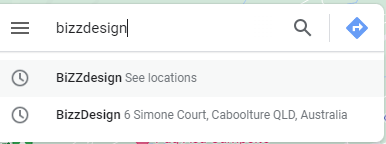
3. If your company name does not appear, a drop-down menu will appear with the option to "Add a missing place to Google Maps".

When you click that, you need to tick the “Add your business” button and you'll be asked for your place name, category, address, and location within, Add more details (including hours, contact, website URL, about, and photos) and finally click the “claim this business”.

It's worth noting that anyone in the world can add a business to Google Maps. Even if you haven't done so yet, it's a good idea to double-check that your business listing doesn't already exist. And don't worry: the person who adds your business to Google Maps has no control over that listing, regardless of who it is. Only the person who claims the listing by proving ownership of the business has that control, which we'll discuss next.
2. Verify and claim your Business Listing(s)
You should double-check your business listing. Google typically requests verification during account creation and any critical information updates.
Verifying your company makes it more credible in the eyes of its competitors and improves its ranking on search engines (search engine result pages).
Consider getting your company Google Guaranteed as an extra step. This is not a free opportunity, but earning the green badge helps you gain customer trust and credibility.
3. Fill out your Google Maps business listing with information.
So, now that you've created a Google Maps business listing and linked it to a Google Business Profile account, you're ready to optimise it for higher ranking in local search results. As previously stated, the more information your listing provides, the higher it will rank in search results. Log in to your Google Business Profile account to add more details to your listing.
Choose the "Edit Profile" icon, where you can enter your name, category, address, location and areas (if applicable), hours, special hours, phone number, website, and description.

Here are some pointers for optimising these Google Business account sections for higher Google Maps ranking:
Maintain consistency in your name and address.
Google Maps ranks businesses that it believes are trustworthy, and one indicator of your trustworthiness is the consistency of information about your company across the web. Assume you own a company called "North Shore Wellness Center." Make sure your business name (creative business name ideas here!) in your Google Business Profile dashboard is exactly that and not a slight variation, such as N. North Shore Wellness Ctr. or Shore Wellness Ctr. Make sure this name is consistent across all of your online properties, including your website, Yelp listing, Facebook profile, and others. The same is true for address information (for example, using "St" rather than "Street").
Make use of a local phone number.
Google is wary of toll-free (800 and 877) numbers because they are frequently used for spam. Use a local phone number with your location's area code. This will help you rank higher in Google Maps, as well as confirm to searchers that your business is in that area.
Keep your business hours updated.
Google Maps business listings inform users whether a business is open, closed, or will open or close soon. Make sure to update your holiday hours as well. Keeping these hours updated signals to Google that you're active and, thus, trustworthy, which will help your rank. It will also prevent customers from travelling to your store only to discover that it is closed or closing, which can sometimes result in a negative review (which hurts your ranking on Google Maps).
Create a company description.
The description on your Google Maps business listing should provide a high-level overview of your company to help visitors navigate, as well as unique features to entice searchers. It should also be written in a tone that is consistent with your brand in order to establish a stronger connection. Include keywords in your business description to help your Google Maps listing rank not only for searches containing your business name but also for searches for products and services.
Sort your company into the appropriate categories.
The category of your business as it appears on Google Maps is very important in terms of ranking. Choose the category that best represents your company's core offering as your Primary category. If any other categories apply, mark them as Additional categories.
Keep in mind that you cannot add custom categories, but if you begin typing your main offering into the box, different categories will appear for you to select from.
4. Upload images to your Google Maps business listing.
When you add photos to your listing, Google loves it. First, it indicates that you are an active listing worthy of ranking higher in search results. Second, Google's photo-recognition technology is improving, and Google is beginning to include images in local search results. Third, the SEO rule of thumb is that Google likes what people like, and people like photos.
Upload high-quality and compelling photos to your business listing that capture what it's like to be at your business to improve your Google Maps ranking. To do so, go to your Google Business Profile dashboard's "Add Photo" icon and click on the “Photo” tab and click “Select photos or videos”. You will then be able to drag and drop multiple photos and/or videos at the same time. You should try to upload at least one new photo per day.
5. Obtain Google Reviews.
Given that Google values what customers value, it should come as no surprise that Google Maps prioritises business listings with positive reviews. So, how do you increase your Google reviews? When you create a Google Maps business listing, you automatically open your business up to reviews.
However, this does not guarantee that you will receive them. You must be proactive in soliciting reviews and responsive in responding to them. Responding to reviews encourages and lessens the impact of negative reviews. Furthermore, your responses demonstrate to other prospects how attentive you are to customers and how well you resolve problems.
Reviews can be frightening, but unless your service is truly terrible, negative feedback is rare. Furthermore, if you respond appropriately, you can mitigate and even reverse the negative impact of a negative review.
6. Combine your Google Maps listings.
Google will penalise businesses that have multiple phone numbers or locations listed for the same actual business. Remove duplicate listings and unnecessary information to ensure your one true listing ranks.
7. Post to your Google Maps business listing on a regular basis.
You can publish posts that appear directly on your Google Maps business listing, just like on Facebook. Regularly posting in this manner sends signals to Google that you actively manage your listing, which it takes into account when ranking. Furthermore, when consumers use search engines, they have high intent, so you can get your offers in front of a ready-to-engage audience through Google posts.
How to Optimise Your Website for Google Maps
In addition to taking action directly on your business listing, you can optimise your website to support a higher Google Maps ranking.
Make certain that your website is mobile-friendly.
The first step is to ensure that your website is responsive, which means that it works consistently on any device or screen size. This is due to the fact that Google Maps business listings include a link to your website, and nearly 60% of Google searches are conducted on mobile devices. Your Google Maps ranking will suffer if your listing directs searchers to a website that requires pinching and zooming, has broken links, or is slow to load.
Include local keywords on your website.
The second way to improve your Google Maps ranking is to optimise your website for local search. This will, of course, help your website rank higher in Google Search, but it may also affect how high your Google Maps business listing ranks. So make sure to include location-based keywords on your site's main pages, such as the homepage, about us page, contact us page, products and services page, and even blog posts—not just the title of the pages, but also the headings, body text, image tags, captions, and URLs.
Using your website to emphasise to Google that you are prominent in your local area can help Google feel more confident in ranking your business listing on Google Maps for that area.
Add a Google map to your website.
Another way to improve your Google Maps ranking is to embed a Google map on your website, which most businesses do on the contact us page. Embedding a Google map is simply another way of informing Google that your business is located where your listing claims. Use the same address as your Google Maps business listing.
To embed a Google Map on your website, search Google Maps for your company name. In your listing, click "Share" and then the "Embed a map" tab. Copy and paste the link into your contact page.
Get Your Business to the Top of Google Maps
Google Maps business listings are becoming more sophisticated, allowing consumers to quickly obtain the information they require and make informed purchasing decisions. Follow the tips in this post to get your business to the top of Google Maps and enjoy the increased visibility, engagement, and revenue that comes with it! You can also